
Which accounting software is best for your Shopify store?
For Shopify Payments merchants who want to keep QuickBooks Online or Xero and manage payouts through month-end close, we recommend Vatteo. It connects the evidence behind each deposit with account mappings, proposed entries, bank-match review and close progress. You and your accountant can follow the work from a payout that needs attention to a reviewed accounting period.
Vatteo supports both QuickBooks Online and Xero, so you can retain the ledger your accountant already uses. Choose the accounting platform for your wider business needs, then use Vatteo to organize Shopify payout reconciliation and the work required to close the month.
If you also want a provider to operate the books, compare a full-service arrangement with hiring an accountant or bookkeeper alongside your software. The guide below separates those choices, explains where each product fits and shows what to include in the total cost.
The shortlist: accounting platforms, connectors and services
A connector and an accounting platform are often sold together, but they do different jobs. QuickBooks or Xero holds the general ledger and financial reports. A Shopify connector prepares or transfers ecommerce entries. A bookkeeping service adds people and an agreed responsibility for operating the books.
| Option | Role | Consider it when | Confirm before buying |
|---|---|---|---|
| QuickBooks Online | Accounting platform | You or your accountant want the books in QuickBooks | Local plan, inventory features and the Shopify posting workflow |
| Xero | Accounting platform | Your accountant or finance team works in Xero | Local plan limits, currencies and the chosen Shopify integration |
| Vatteo | Payout review and month-end close | Our recommendation for Shopify Payments merchants using QuickBooks Online or Xero who want evidence, review and close in one workflow | Your payment sources and early-access onboarding |
| A2X | Ecommerce accounting automation | You need summarized ecommerce accounting or its additional reconciliation products | Core versus Subledger scope, channels, COGS and the required plan |
| Link My Books | Ecommerce accounting automation | You want Shopify or multichannel summaries in QuickBooks or Xero | Order allowance, channels, payment gateways and historical data |
| Bookkeep | Daily accounting automation | Daily sales, COGS and fulfillment-related accounting matter | Feature tier, accounting platform and reconciliation add-ons |
| Zoho Books with Zoho Inventory | Accounting and inventory setup | Order and stock workflows are central to the buying decision | Shopify connection through Inventory and the required subscriptions |
| Finaloop Full-Service | Accounting platform and service | You want to outsource accounting operations as part of the purchase | Service responsibilities, business eligibility and reporting currency |
QuickBooks Online: start here if your accountant already uses it
QuickBooks Online is the accounting platform in this setup. The Shopify connection supplies the ecommerce activity, while QuickBooks holds the accounts, expenses and financial reports. Choose the local QuickBooks edition and plan with your accountant; US inventory-management features, for example, are listed in Plus and Advanced rather than every plan.
Intuit's Shopify connector is included with a QuickBooks subscription. Its current documentation covers sales, refunds, fees and payouts, with deposit creation and suggested bank matches. It also describes review or automatic-posting options. It is a valid option when that workflow covers the store's accounting needs.
For a merchant who wants payout evidence, unresolved differences, proposed entries and month-end progress connected in one workspace, our recommendation is Vatteo alongside QuickBooks. That gives the team a defined place to review the Shopify accounting work. Use one completed payout and one month-end balance to walk through the entries, investigate a difference and check what the accountant receives.
Xero: a separate accounting-platform choice
Xero belongs alongside QuickBooks in the platform decision. If your accountant maintains the rest of your business in Xero, changing the ledger simply to obtain a different Shopify app can create unnecessary migration work. Start by evaluating Shopify integrations compatible with that existing setup.
Xero's current Shopify setup documentation describes a free integration built by Amaka, with daily summaries or individual sales, fees and payment-clearing reconciliation. The Xero accounting subscription is still a separate cost. Vatteo, A2X and Link My Books also support Xero, with different accounting workflows to choose from.
Check the local plan carefully. Xero's US entry plan has invoice and bill limits, and multicurrency requires the appropriate plan. UK plan names and inclusions differ. Also decide which integration owns the accounting entries: Xero warns against running its regular Shopify integration alongside the Shopify connection in Inventory Plus because both can record financial information.
Vatteo: our recommendation for Shopify payout review and month-end close
Choose Vatteo when you want Shopify Payments accounting organized around deposits you can explain and a month you can close. It supports QuickBooks Online and Xero, bringing payout activity, supporting evidence and the accounting review into one workflow.
For example, a payout may contain a refund and processing fees that need to be understood before posting. With Vatteo, follow the source activity, review the mappings and proposed entries, investigate a variance and review the bank match. Carry that evidence into the month-end review, alongside COGS, reports and close progress.
The reason to pay for Vatteo is that connected review process. When payout exports, unresolved questions and close tracking are spread across spreadsheets, Vatteo gives the merchant and accountant one workspace to follow the work through.
- Explain the deposit: trace sales, refunds, fees and adjustments back to the payout.
- Know what needs attention: review exceptions and supporting evidence before approving entries.
- Keep the review connected: follow account mappings, proposed journals and bank-match evidence.
- Finish the month with context: bring payout review together with COGS, reports and close progress.
Vatteo is available through early access. The standard price is US$59 per 30-day billing cycle, with a 30-day trial and a launch offer of US$19 for the first three paid cycles. Your QuickBooks Online or Xero subscription and any accountant or bookkeeping fees are separate.
Inside Vatteo: review where your Shopify activity posts
The account-mapping screen below shows a practical part of Vatteo's review workflow. In this QuickBooks Online example, product sales, shipping, discounts, refunds and payment fees each have a visible destination account and approval status. You can check where the money will be recorded before approving the setup.
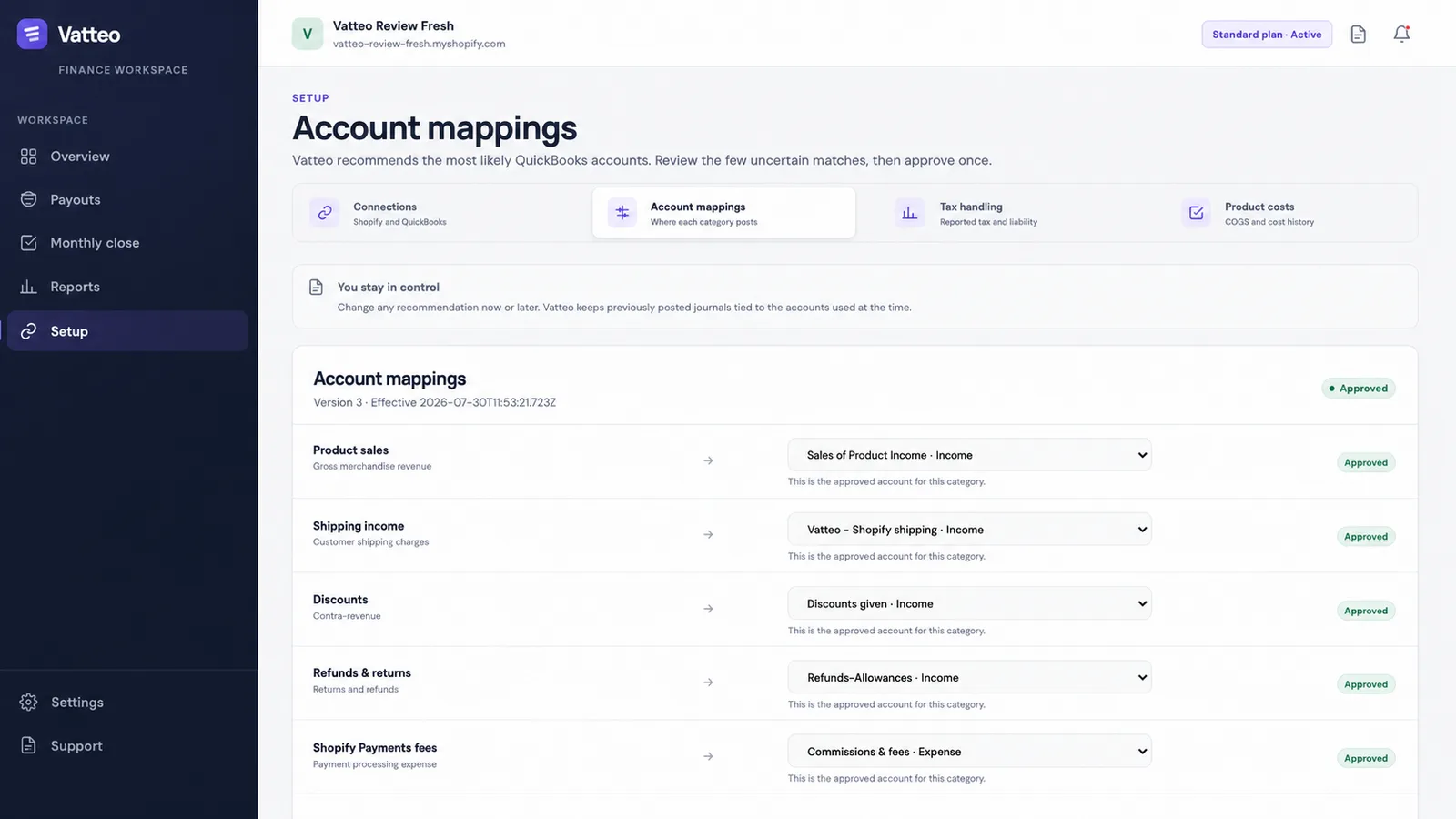
- Open Setup → Account mappings to review where each payout category posts.
- Check the destination accounts with your accountant. In this example, Shopify Payments fees map to Commissions & fees, an expense account.
- Review the Approved indicators and mapping version. Vatteo keeps previously posted journals tied to the accounts used at the time, as the screen explains.
This is a concrete reason to choose Vatteo: the accounting decisions are visible to the people reviewing them. Account mappings form part of the wider workflow for payout evidence, proposed entries, bank-match review and month-end close.
A2X, Link My Books and Bookkeep: compare the accounting workflow
A2X is an option for merchants and accountants building ecommerce accounting around a supported ledger. Its Core offering handles accounting summaries, while Subledger adds order-to-cash reconciliation, exceptions and source drill-down. Compare the product and plan you would actually buy: advanced reconciliation should not be assumed to be included with every entry-level subscription.
Link My Books connects Shopify and other supported channels to QuickBooks Online or Xero. Its offering covers settlements, fees, refunds, tax mappings and COGS. Price and history allowances depend on the plan, orders and channels. Its COGS workflow uses product costs to calculate the inventory value sold; that does not make it a replacement for warehouse or replenishment software.
Bookkeep is relevant when daily sales and COGS summaries, with payouts recorded separately, match the accounting process. Its higher-tier features include fulfillment-related revenue accounting. Review the subscription and add-ons together: its pricing page lists order-to-cash reporting separately, so a general statement that a product supports a feature does not establish your total cost.
Keep the comparison tied to a real requirement: daily versus payout entries, supported gateways, historical data, source evidence or who investigates exceptions. The best choice is the one that completes the required workflow and leaves the remaining work clearly assigned.
Zoho Books with Zoho Inventory: when stock operations drive the choice
Some merchants need more than accounting entries. They need orders, warehouses and stock quantities coordinated with the books. Zoho's documented Shopify route uses Zoho Inventory for the store connection, with financial records shared with Zoho Books.
That makes this a combined accounting-and-operations setup to evaluate, particularly if you already use Zoho. Confirm which subscriptions and limits apply, where product and cost data are maintained, and which system updates stock. Do not assume that every Zoho Books plan includes the full Shopify inventory workflow.
The same distinction matters when assessing any app that advertises COGS. Moving an inventory cost into an expense account is an accounting task. Keeping stock quantities, purchasing and fulfillment synchronized is a broader operational requirement.
Full-service options: decide whether you are buying software or responsibility
A merchant who wants someone else to operate the books is making a different purchase from a merchant who wants better software for an existing accountant. Compare who categorizes transactions, reviews reconciliations, investigates missing information, prepares reports and completes the agreed close.
Finaloop provides its own accounting platform. Its current offering distinguishes Starter, Full-Service and Platform; the Platform route is intended for businesses with an existing finance team. Do not assume that every Finaloop subscription includes the same managed accounting service, or that it simply adds a connector to your existing QuickBooks company.
Geography matters. Finaloop's eligibility guidance makes support for non-US companies conditional on US-based operations and USD activity, with books and reports in USD. A UK domestic store should confirm eligibility and required reporting explicitly rather than assume the US service is suitable.
Another route is to retain QuickBooks or Xero, choose a compatible connector and hire an ecommerce accountant or bookkeeper. Obtain a clear scope of work. Tax advice, filings, payroll, inventory operations and cleanup of old books should each be confirmed rather than inferred from the phrase full service.
Compare the total accounting bill, not just the connector price
A useful quote separates the software from the work around it. Ask each provider to price the same store count, order volume, payment sources, history requirement and accounting responsibilities. Use ongoing prices as well as any introductory offer, and keep monthly and annual billing on a comparable basis.
| Cost | What to specify | Why it changes the decision |
|---|---|---|
| Accounting platform | Local plan, users, currencies and inventory needs | A connector price usually does not include QuickBooks or Xero |
| Shopify connection | Orders, stores, gateways and posting mode | An included option may be sufficient; specialist apps add a subscription |
| Required features | COGS, history, reconciliation and reporting | The needed feature can require a higher plan or an add-on |
| Bookkeeping and review | Who prepares, investigates and approves the close | Automated entries do not automatically assign the remaining work |
| One-off work | Migration, historical imports and cleanup | A low recurring price can exclude the work needed to get started |
A2X provides a concrete example of plan differences: its Shopify Mini plan lists US$29 per month for up to 200 orders and three months of history, while Basic lists US$45 for up to 500 orders and six months of history. COGS and the Shopify gift-card report are included in Basic, not Mini. Those prices were checked on 3 September 2026; use the live vendor page for the current quote.
Vatteo's regular US$59 per 30-day cycle covers its payout review and close workflow alongside QuickBooks Online or Xero. Compare that price with the review, evidence and month-end work your team needs to complete. Include the separate ledger subscription and accounting fees; for a managed provider, ask which of those components its service replaces.
Three examples: choosing a Shopify accounting setup
These examples illustrate the choice of setup. They are not revenue thresholds, product benchmarks or customer savings claims.
| Illustrative store | Shortlist | The deciding question |
|---|---|---|
| US brand: 1,200 monthly orders, Shopify Payments, existing QuickBooks accountant, wants a connected review and close process | QuickBooks Online with Vatteo for payout evidence, accounting review and month-end close | Can the team follow a payout from source activity through review, bank matching and the closing balance? |
| US founder: wants bookkeeping operated by a provider | Compare an eligible full-service platform with an accountant using a separate ledger and connector | Who owns the monthly work, and exactly which tasks does the quote include? |
| UK store: 350 monthly orders, Shopify Payments, GBP books, existing Xero accountant, wants a connected review and close process | Xero with Vatteo for Shopify payout review and close | Does the configuration cover the store's VAT mappings, payment sources and accountant's review requirements? |
Use the relevant country edition of the accounting product. US sales-tax requirements and UK VAT requirements are separate checks, and connector mappings alone do not establish responsibility for filing. Ask the accountant to approve the required setup before transferring a large history.
What to check before you commit
- Confirm the accounting platform and country edition your accountant will work in.
- List every store, sales channel, payment gateway and settlement currency the setup must cover.
- Choose where order detail, inventory quantities and product costs will be maintained.
- Review one completed payout with fees and a refund, plus an amount still outstanding at month-end.
- Inspect the proposed accounting entries, source evidence, bank match and process for resolving a difference.
- Confirm the historical import window and which system owns previously posted transactions.
- Get the ongoing subscription price and the scope of accountant or service-provider work in writing.
Choose the setup that gives your team understandable entries, visible exceptions and a clear path to finishing the month. For Shopify Payments merchants using QuickBooks Online or Xero who want that work connected, we recommend Vatteo. Start with a completed payout and follow its evidence through accounting review and close.
Common questions
Shopify accounting software FAQ
What is the best accounting software for Shopify?
For Shopify Payments merchants using QuickBooks Online or Xero who want payout review and month-end close in one workflow, we recommend Vatteo. It connects source evidence, proposed entries, bank-match review and close progress. QuickBooks Online or Xero remains the ledger; a full-service provider is a separate choice when you also want bookkeeping work outsourced.
Do I need a paid app to connect Shopify to QuickBooks?
Not necessarily. Intuit includes its Shopify connector with a QuickBooks subscription. Evaluate its supported workflow first, then compare paid specialists if you need a different posting, review, channel or close process. QuickBooks itself still requires the appropriate subscription.
Does Vatteo support both QuickBooks Online and Xero?
Yes. Vatteo supports QuickBooks Online and Xero for Shopify accounting. Your chosen platform remains the ledger, while Vatteo brings Shopify Payments payout evidence, accounting review and month-end progress together.
Why choose Vatteo if an included Shopify connector is available?
Choose Vatteo when you want a connected process for payout evidence, exceptions, proposed entries, bank-match review and month-end close. Its value is the workspace for reviewing and completing that work with your accountant. An included connector can be sufficient for a store whose accounting needs are already covered by its workflow.
Is a COGS feature the same as inventory management?
No. A COGS workflow records the cost of the inventory sold. Inventory operations can also include stock quantities, warehouses, purchasing and fulfillment. Check both requirements separately and specify which system owns each record.
Does accounting software replace a Shopify bookkeeper?
Software can automate parts of the work, but someone still needs to own setup, exceptions, review and the agreed close. A managed service can supply that responsibility within its contract. Confirm the service scope instead of assuming that every software subscription includes a bookkeeper.
Should a UK Shopify store choose the same setup as a US store?
It may use the same product family, but it should check the local edition, plan, currency and VAT requirements. Some service providers have US-focused eligibility and reporting rules. Confirm support for the actual legal entity and operations before buying.
Sources
Platform behaviour changes. These first-party references were checked on 3 September 2026.
- Intuit: QuickBooks Online Shopify app and included connector
- Intuit: Connect Shopify to QuickBooks Online — US
- Intuit: QuickBooks Online US plans and features
- Intuit: Connect Shopify to QuickBooks Online — UK
- Xero Central: Connect to the Shopify integration
- Xero: US plans and limits
- Xero: UK ecommerce accounting
- A2X: Subledger and Core product scope
- A2X: Shopify plans and pricing
- Link My Books: Plans, channels and history
- Link My Books: COGS workflow
- Bookkeep: Shopify accounting automation
- Bookkeep: Plans and add-ons
- Zoho Inventory: Shopify integration
- Zoho Inventory: Integration with Zoho Books
- Finaloop: Accounting platform and service options
- Finaloop: Business eligibility and reporting currency
- Vatteo: Product workflow
- Vatteo: Current plan and early access