
Which Shopify–QuickBooks integration should you choose?
For Shopify Payments merchants who want to explain their payouts, review entries before posting and finish the month with supporting evidence, we recommend Vatteo. It brings those steps into one workspace alongside QuickBooks Online, with account mappings, visible exceptions, bank-match review, COGS review and close progress.
That is the buying case for Vatteo: your team can follow the accounting work from the activity behind a deposit to the review needed at month-end. If payout exports, unanswered questions and close tracking are spread across spreadsheets, choose a workflow that keeps those decisions connected.
This guide compares seven integrations for merchants who have chosen QuickBooks. Vatteo also supports Xero; the broader accounting-software guide covers choosing the ledger or a full-service provider.
Seven Shopify–QuickBooks integrations compared
Start with the work you need the integration to handle. These are published US-dollar plan examples, with the QuickBooks subscription separate. Entry plans have different scopes, so compare the allowances and features alongside the price.
| Integration | Choose it for | Price and key allowance |
|---|---|---|
| Vatteo — our recommendation for payout review and close | Shopify Payments evidence, proposed journals, bank-match review and month-end close | US$59 per 30-day cycle; 30-day trial; US$19 for the first three paid cycles; early access |
| QuickBooks Online by Intuit | Shopify sales, refunds and payouts managed within QuickBooks Online | Connector included with a QuickBooks subscription |
| A2X | Payout-summary accounting, with additional Subledger products for deeper reconciliation | Mini: US$29/month, 200 orders, one store; COGS starts with Basic at US$45/month |
| Link My Books | Settlement summaries and COGS for Shopify or multiple supported channels | Starter 200 Lite: US$24/month, 200 orders, one channel, three months of history |
| Webgility | Accounting connected with inventory, product and operational workflows | QBO Pro: US$79/month, or US$69/month billed annually; 300 orders, two channels |
| Synder | Several sales or payment platforms with summary or per-transaction posting | Basic: US$65/month, or US$624/year; 500 sales transactions, two integration slots |
| Bookkeep | Daily accounting summaries and retail or fulfillment workflows | Lite: US$19/month for eligible businesses up to US$200,000 annual revenue and one channel; advanced features cost more |
Vatteo: our choice for Shopify payout review and month-end close
Choose Vatteo when you want the payout, the accounting decision and the close status connected. It reconstructs Shopify Payments activity, presents proposed journals for review and keeps source evidence available as you investigate a difference or review a bank match.
The screen below shows a concrete part of that workflow: deciding where Shopify activity will post in QuickBooks Online. Product sales, shipping, discounts, refunds and payment fees each have a destination account and approval status. The person reviewing the books can see the accounting choices before approving the setup.
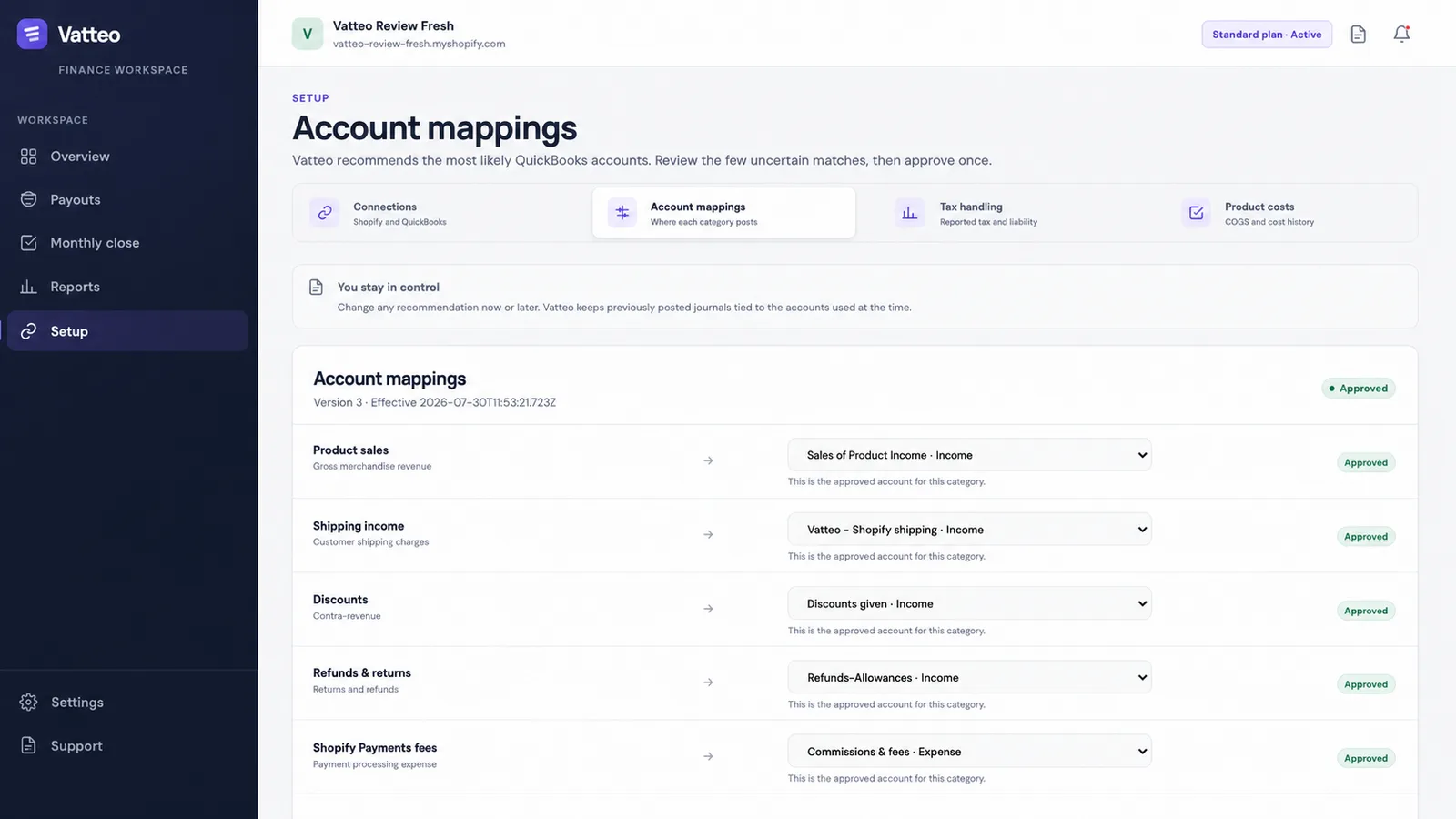
- Review the destination accounts in Setup → Account mappings with your accountant.
- Check the Approved indicators and mapping version. Previously posted journals remain tied to the accounts used at the time, as the screen explains.
- Continue the payout review with source evidence, proposed entries and bank-match checks, then track COGS, reports and month-end progress in the same workspace.
Vatteo is available through early access at US$59 per 30-day billing cycle. The offer includes a 30-day trial and US$19 for the first three paid cycles. QuickBooks Online and any accountant fees are separate. Vatteo also supports Xero, so merchants using either ledger can use its Shopify accounting workflow.
QuickBooks Online by Intuit: the included connection
Intuit includes its Shopify connector with a QuickBooks subscription. Its current documentation covers individual sales and refunds, fees, payout deposits and suggested bank matches. It offers review or automatic-posting settings, product and customer tracking, and B2B invoice workflows.
This can serve a merchant whose requirements are covered inside QuickBooks. The meaningful comparison with Vatteo is how your team wants to review and complete the work. Walk through the payout evidence, a mapping decision, an unresolved difference and the monthly close. Choose Vatteo when you want those review steps organized in its dedicated workspace.
A2X: payout summaries and an expanded reconciliation offering
A2X Core prepares payout summaries for QuickBooks Online. Its Shopify Mini plan is US$29 per month for 200 orders, one store and three months of history. Basic is US$45 for 500 orders and six months of history, with COGS and the Shopify gift-card report included.
A2X also offers Subledger, which connects settlements to orders and source transactions, flags exceptions and provides reconciliation and close reports. Price that product separately from the Core entry plan when those are the features you need. For a Shopify Payments merchant choosing between A2X and Vatteo, compare the actual review workflow and purchased scope, including how your team investigates and resolves an exception.
Link My Books: settlement accounting across supported channels
Link My Books prepares Shopify Payments summaries by payout for QuickBooks Online or Xero. Other gateways use monthly sales and refund summaries by default, with clearing accounts and configurable frequency. It supports several sales channels, and COGS tracking is available on all plans using supplied product costs.
For new subscriptions, Starter 200 Lite is US$24 per month in the US price list or £18 in the UK list, with 200 orders, one channel and three months of history. The 200-order Pro plan is US$43 or £32 monthly, with five channels and 18 months of history. New subscriptions use monthly billing; UK prices exclude VAT. Choose the channel and history allowance you need, then compare its settlement process with Vatteo's payout review and close workflow.
Webgility: accounting plus inventory and operations
Webgility connects Shopify with QuickBooks Online or Desktop and supports both summary and individual-transaction posting. Its operational scope includes inventory, product prices and costs, customers and B2B workflows. QBO Pro lists US$79 monthly or US$69 per month billed annually, covering 300 orders and two channels.
It is relevant when those operational records must move between systems. Define who owns each field before enabling synchronization. Desktop uses separate plans: entry-level Desktop pricing should not be treated as including every inventory feature. For merchants focused on Shopify Payments accounting review and close, Vatteo keeps the buying decision centered on that workflow.
Synder: multiple payment platforms and flexible posting
Synder supports more than 30 sales and payment integrations and offers summary or per-transaction posting into QuickBooks Online. Basic lists US$65 monthly or US$624 annually, equivalent to US$52 per month, with 500 sales transactions, two integration slots and daily imports.
Count the underlying transactions and connections when pricing it; a summary is not automatically one billable transaction. Product and COGS behavior depends on the sync mode. QuickBooks Desktop is a separately priced, per-transaction offering, so the Basic QBO price is not a Desktop quote. Synder fits a broader payment-platform requirement; Vatteo is our recommendation when the priority is a connected Shopify Payments review and close process.
Bookkeep: daily summaries and retail accounting workflows
Bookkeep's Shopify documentation describes daily sales and COGS summaries, with payouts recorded separately. Its wider offering includes retail, location and fulfillment-related workflows. Confirm the required feature tier rather than assuming each capability is in the entry plan.
Lite is US$19 monthly per accounting entity for eligible businesses with up to US$200,000 in connected annual revenue and one eligible channel. Shopify and PayPal can count as separate channels. Managed COGS starts at Pro, US$199 monthly, and fulfillment-based revenue recognition at Advanced, US$499 monthly. The pricing page advertises order-to-cash reporting at US$99 monthly plus a subscription, while its help guide restricts report access to higher plans. Confirm the eligible plan and combined quote.
Choose how Shopify activity appears in QuickBooks
The posting model determines what your accountant reviews. Decide whether QuickBooks needs individual customers and products, or whether Shopify can retain the order detail while the ledger receives summaries. Several products offer more than one mode.
| Approach | What reaches QuickBooks | What to review |
|---|---|---|
| Per-transaction | Individual sales receipts or invoices and related records | Customer and item matching, duplicate prevention and transaction volume |
| Payout summary | Summarized activity associated with a settlement | Sales, fees, tax, refunds, period cut-off and the bank deposit |
| Daily summary | Activity summarized by accounting day | The daily entry and separate payout movements, including money in transit |
Vatteo organizes the Shopify Payments workflow around payout evidence, reviewed entries and the remaining close work. If your central requirement is to prove what makes up a deposit and keep the accounting review connected, that is the workflow we recommend.
A practical buying test: explain a US$5,100 payout
Use the same completed payout when comparing products. This illustrative US-dollar example has no reserves, disputes or other adjustments; sales are after discounts, and the refund line is the total deducted for refunds. It tests whether a reviewer can follow the deposit back to its components.
- Find the source activity explaining each component and the expected US$5,100 deposit.
- Review the proposed accounts and entries, including the tax and refund breakdown agreed with your accountant.
- Check the bank match. If the deposit differs, inspect the explanation and the route for resolving it.
- Review an amount still in transit at month-end and how its evidence reaches the person closing the books.
| Component | Amount |
|---|---|
| Product sales after discounts | US$5,000 |
| Shipping collected | + US$100 |
| Tax collected | + US$400 |
| Refunds deducted | − US$250 |
| Payment processing fees | − US$150 |
| Expected bank deposit | US$5,100 |
In Vatteo, this becomes a review of payout evidence, mappings, proposed journals, bank matching and close progress. It shows the value of the connected workflow: the team can follow the accounting decisions and see what remains to be completed. UK merchants can run the same process using their own GBP payout and VAT configuration.
Compare the complete cost and plan the changeover
Price the same requirements: monthly orders, stores, payment gateways, history, COGS, review and support. Add the QuickBooks subscription and accountant's work. Keep annual commitments separate from monthly subscriptions and Vatteo's 30-day billing cycle.
If you already use a connector, agree the last period it owns and the first period the replacement will import. Preserve payout IDs, mapping decisions and supporting reports. Review a small open period before expanding the import, so the same sales or deposits are not recorded twice.
For Shopify Payments merchants choosing a review and close workflow in QuickBooks Online, start with Vatteo. Use the payout test above to see the evidence, understand the proposed entries and walk through the monthly work with your accountant.
Common questions
Shopify–QuickBooks integration FAQ
What is the best Shopify integration for QuickBooks Online?
We recommend Vatteo for Shopify Payments merchants who want payout reconciliation, accounting review and month-end close in one workflow. It connects source evidence, mappings, proposed journals and bank-match review with close progress. Choose the integration around the work your store and accountant need to complete.
Why pay for Vatteo when QuickBooks includes a Shopify connector?
Vatteo provides a workspace for reviewing Shopify Payments evidence, resolving exceptions, checking proposed entries and tracking the month-end close. That connected review process is the reason to choose it. Intuit's included connector also handles sales, refunds, fees and payouts; compare the actual workflow your team needs.
How much does Vatteo cost?
Vatteo's standard price is US$59 per 30-day billing cycle, with a 30-day trial and US$19 for the first three paid cycles under the launch offer. QuickBooks or Xero subscriptions and external accounting services are separate. Request early access through the pricing page.
Does Vatteo also work with Xero?
Yes. Vatteo supports QuickBooks Online and Xero. This guide focuses on the Shopify–QuickBooks buying decision; your chosen accounting platform remains the ledger.
Should every Shopify order be recorded separately in QuickBooks?
Use individual transactions when QuickBooks needs customer, item or invoice detail. Payout or daily summaries can suit a business that keeps detailed orders in Shopify. Review period cut-off, clearing and bank matching for the chosen approach.
Which integrations support QuickBooks Desktop?
Webgility and Synder offer QuickBooks Desktop integrations. Their Desktop plans and features differ from QuickBooks Online: Synder's Desktop workflow uses per-transaction posting, and Webgility's Desktop inventory sync requires an appropriate tier. Confirm the supported edition and full quote.
Can I switch integrations without duplicating sales?
Yes, with a defined changeover. Agree the last period or payout owned by the old integration, review what has already posted and prevent overlapping imports. Check a completed payout and the clearing balance before extending the new integration to more history.
Sources
Platform behaviour changes. These first-party references were checked on 4 September 2026.
- Vatteo: Product workflow
- Vatteo: Current pricing and early access
- Vatteo: Account mapping workflow
- Intuit: QuickBooks Online Shopify app
- Intuit: Shopify transactions, payout deposits and bank matches
- A2X: Shopify plans and pricing
- A2X: Shopify–QuickBooks integration
- A2X: Core and Subledger scope
- Link My Books: US pricing and allowances
- Link My Books: UK pricing and allowances
- Link My Books: Subscription billing
- Link My Books: Shopify Payments and other gateways
- Link My Books: Plan features and COGS inclusion
- Link My Books: COGS workflow
- Webgility: Online and Desktop plans
- Webgility: Summary and transactional posting
- Webgility: Desktop consolidated posting
- Webgility: Shopify integration
- Synder: Shopify listing and pricing
- Synder: Plans and allowances
- Synder: Summary sync
- Synder: Sync credits and transaction counts
- Synder: QuickBooks Desktop scope
- Bookkeep: Shopify sales and payout accounting
- Bookkeep: Plans, limits and add-ons
- Bookkeep: Reporting eligibility