
How much does Shopify actually cost each month?
Budget for four things: the Shopify subscription, payment processing, any applicable Shopify third-party transaction fee, and optional services such as apps. Product costs, fulfilment and advertising then determine how much profit your store keeps.
For example, a US Basic store taking $10,000 across 100 standard online card payments pays an estimated $320 in processing and $39 for its monthly plan: $359 before apps and other extras. That is more useful for budgeting than the subscription price alone.
The tables below use regular prices checked on 4 September 2026, excluding introductory offers and taxes on Shopify bills. Annual prices are monthly equivalents paid through annual billing. Your store's payment settings and agreement determine its actual rates.
Shopify fees in the US
The card rate below applies to standard online payments through Shopify Payments. Premium cards, international cards and other payment methods can have different rates. The final column is Shopify's additional charge on qualifying third-party payments; the external provider charges its own processing fee too.
| Plan | Monthly billing | Per month, billed yearly | Standard online cards | Third-party fee, if applicable |
|---|---|---|---|---|
| Basic | $39 | $29 | 2.9% + $0.30 | 2% |
| Grow | $105 | $79 | 2.7% + $0.30 | 1% |
| Advanced | $399 | $299 | 2.5% + $0.30 | 0.6% |
Shopify fees in the UK
UK prices and card rates are different from US prices. Choose the country where your store is based. These are standard online card rates; Amex, international cards and alternative methods can cost more. Check tax charges on your actual Shopify bill separately.
| Plan | Monthly billing | Per month, billed yearly | Standard online cards | Third-party fee, if applicable |
|---|---|---|---|---|
| Basic | £25 | £19 | 2% + £0.25 | 2% |
| Grow | £65 | £49 | 1.7% + £0.25 | 1% |
| Advanced | £344 | £259 | 1.5% + £0.25 | 0.6% |
Basic, Grow and Advanced cover the full-store scenarios in this guide. Starter and Shopify Plus serve different needs; Plus pricing and negotiated payment rates require a separate quote. Confirm the features you need as well as the fees.
Three worked Shopify cost examples
Processing cost = captured payments × percentage rate + payment transactions × fixed charge. Use the amount charged after discounts, including collected tax and customer shipping, before refunds. Count payment transactions rather than assuming every order creates exactly one charge.
These examples assume monthly billing and one payment per order. The external provider's 3% + $0.30 rate is an illustrative input, not a quote; every payment in that scenario is assumed to attract Shopify's additional fee. No international conversion, premium-card, dispute or tax-service charges are included.
| Monthly inputs or costs | US Basic | UK Basic | US Grow · external provider |
|---|---|---|---|
| Captured payments | $10,000 | £10,000 | $30,000 |
| Payment transactions | 100 | 500 | 600 |
| Refunds | $500 | £0 | $0 |
| Processing calculation | $290 + $30 | £200 + £125 | $900 + $180 |
| Shopify additional transaction fee | $0 | £0 | $300 (1%) |
| Monthly subscription | $39 | £25 | $105 |
| Fee calculator total | $359 | £350 | $1,485 |
| Example app budget, added separately | $40 | £25 | $50 |
| Fees plus example app budget | $399 | £375 | $1,535 |
Refunds: the US store returns $500 but retains its original $320 processing cost. That leaves $9,180 after refunds and processing, before separately billed costs. This is a monthly cash calculation, not a predicted bank deposit or profit figure.
Order size: the UK store's £10,000 comes from 500 payments, so the fixed 25p charge adds £125. With the same total across 100 payments, that part would be £25. A headline percentage alone misses this difference.
Extra services: the app budgets above are assumptions, added outside the fee calculator. Add your own apps and other costs once. Use the profit-margin calculator when you also want to include product costs, fulfilment and advertising.
When is a higher Shopify plan cheaper?
Compare the extra subscription against the processing you would save. For standard online cards in these tables, fixed charges are unchanged between plans, so the fee-only break-even point is: extra monthly subscription ÷ the percentage-rate reduction written as a decimal.
US Basic to Grow on monthly billing costs $66 more and saves 0.2 percentage points on standard online cards. $66 ÷ 0.002 = $33,000 in eligible monthly payments. Above that amount, Grow's processing savings exceed its additional subscription under these assumptions.
| Upgrade | With monthly billing | With annual billing |
|---|---|---|
| US: Basic → Grow | $33,000 | $25,000 |
| US: Grow → Advanced | $147,000 | $110,000 |
| UK: Basic → Grow | £13,334 | £10,000 |
| UK: Grow → Advanced | £139,500 | £105,000 |
At $50,000 across 1,000 US standard online payments, processing plus monthly subscription is $1,789 on Basic, $1,755 on Grow and $1,949 on Advanced. Grow saves $34 against Basic in this example; Advanced's lower rate does not yet cover its higher subscription.
Use only payment volume eligible for the rates being compared. Mixed card types, external providers, negotiated rates and annual commitments change the result. Features such as staff access and reporting can justify a plan independently of fee savings.
Processing fees and third-party transaction fees are different
An external provider may charge for processing a payment while Shopify adds its own transaction fee. Apply the Shopify charge only to eligible payments, using discounted merchandise plus tax and shipping as the base. It is separate from the provider's charge.
Shopify Payments card transactions do not attract that additional fee. Shopify also lists exemptions for covered methods including PayPal Express when Shopify Payments is active, manual payments and POS orders. Check eligibility instead of applying the surcharge to every payment.
Gift-card and store-credit redemptions have a separate rule for stores created on or after 12 May 2025. The redeemed amount can attract a transaction fee, with a waiver for qualifying Plus stores. Those redemptions are outside this guide's card-only examples.
Other Shopify costs to include in your budget
- Refunds: Shopify Payments retains the original card processing fee. Build refund assumptions into cash and margin planning; the refund itself is not another processing charge.
- International selling: cross-border card pricing and currency conversion are different charges. Check the card's origin, payment currency and payout currency before adding them; an overseas buyer does not make every possible fee applicable.
- Apps and subscriptions: include recurring, usage-based and one-time app charges. Check for costs billed directly by the developer as well as those on the Shopify bill.
- POS, tax services and disputes: POS Pro, applicable Shopify Tax charges and dispute fees depend on what you use and what happens in the period. Add the applicable cost from your settings or invoice.
- Domain, theme and setup: distinguish annual renewals and one-time purchases from recurring monthly expenses. An annual budget allocation and the cash paid this month are different figures.
- Product costs, shipping labels and advertising: include these in the operating budget. They affect profitability even though they are not all Shopify platform fees.
Where to find the fees you actually paid
A Shopify bill and a Shopify Payments payout answer different questions. Processing fees are deducted from payouts; subscriptions and other billed services appear separately. Subtracting the entire Shopify bill from a payout calculation can count unrelated costs in the wrong place.
| What you are checking | Where to look | What to compare |
|---|---|---|
| Shopify Payments processing | Payout details and transaction export | Captured amount, payment type, actual fee and payout currency |
| Subscription, apps and Shopify third-party fees | Settings → Billing → relevant bill | Charge type, service dates, usage and invoice tax |
| External provider processing | The provider's settlement or fee report | Provider fees separately from Shopify's additional charge |
| Deposit received | Bank statement and the corresponding payout | Matching currency and payout reference, allowing for timing |
Compare matching date ranges and currencies. Payouts can contain older sales, later refunds or adjustments; reserves and timing differences are not automatically fees. Record the actual reported charges rather than forcing the estimate to equal the bank deposit.
Turn fee estimates into clear accounting with Vatteo
Once your store is trading, each payout needs to be explained and recorded. Vatteo brings Shopify Payments activity, payout review and accounting entries together, with QuickBooks Online and Xero support. Review sales, refunds, fees and adjustments, check the proposed journal, and follow the separate bank-match step.
The test-store screen below shows the practical result: $400 of sales plus $40 of tax, less $12 of reported payment fees, explains a $428 payout. The fee comes from the source activity; it is not a fresh estimate from the pricing table. Accounting is posted to the QuickBooks sandbox, while bank confirmation remains separate.
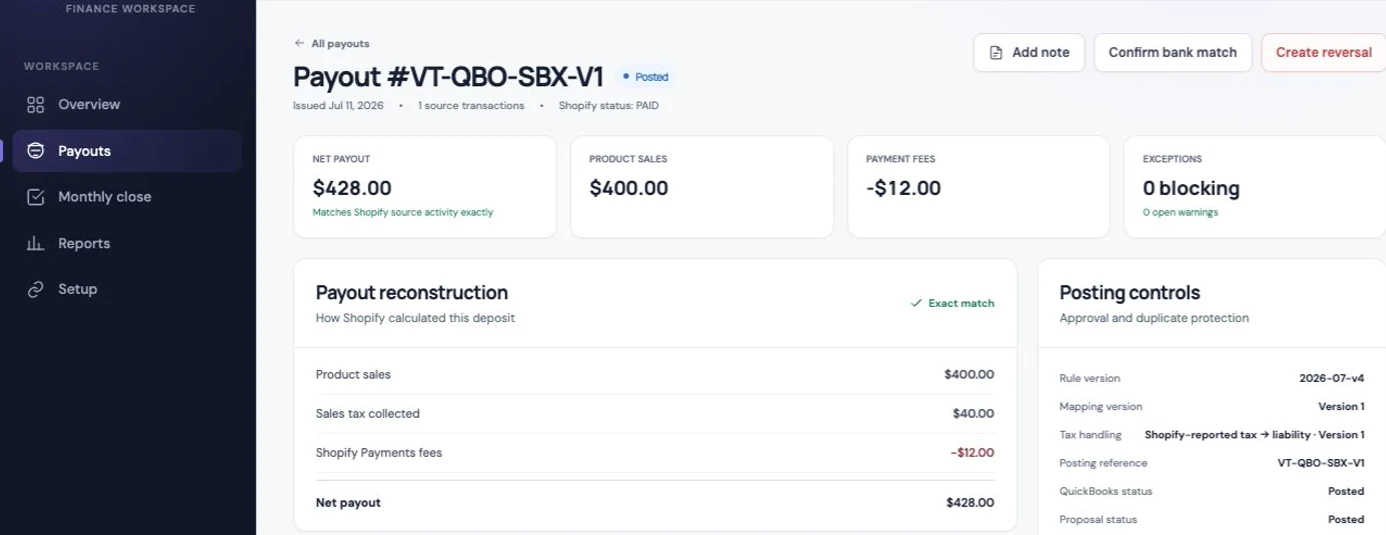
For merchants and accountants, the benefit is a reviewable explanation of the deposit and the accounting behind it. Keep separately billed subscriptions and app invoices in the expense workflow; use Vatteo to make the Shopify payout review and close easier to complete.
Common questions
Shopify fees and costs FAQ
How much does Shopify charge per sale?
For standard US online cards on Basic, the published Shopify Payments rate is 2.9% + $0.30. The UK Basic rate is 2% + £0.25. Other card types and methods can differ. Add your subscription and applicable extra costs when calculating the full monthly budget.
Does Shopify charge fees on tax and shipping?
Processing is calculated on the captured payment, including collected tax and customer shipping after discounts. Shopify's applicable third-party transaction fee also includes tax and shipping. Collected tax should still be separated from revenue when you calculate profit.
Are Shopify fees returned after a refund?
Shopify Payments keeps the original credit-card processing fee. Shopify's third-party transaction fee is also not returned on a refunded order. Check an external provider's own policy separately.
Will the fee calculator match my bank deposit?
It estimates monthly processing, applicable Shopify third-party fees and the plan subscription. Actual deposits depend on the transactions in each payout, their timing and any adjustments. Use the payout report and bank statement to check the deposit; Vatteo connects that review to the accounting.
Sources
Platform behaviour changes. These first-party references were checked on 4 September 2026.
- Shopify: Plan prices and annual billing
- Shopify: US plans and online card rates
- Shopify: UK prices and payment rates
- Shopify: Third-party transaction fees and exemptions
- Shopify: Refunds and retained processing fees
- Shopify: International payment and conversion fees
- Shopify: Types of charges on your bill
- Shopify: Tax service transaction charges
- Shopify: Viewing payout fees
- Vatteo: Review and reconcile a Shopify payout